

Footguns: Here Be Dragons#
There are a few features of the python interface to JITX that we need to be careful about. Most of the time the language server will be able to point you in the right direction. But there are certain cases where seemingly innocuous statements can result in the wrong behavior in your circuit. Some of these issues are just the way that Python works and others have to do with assumptions that JITX made when implementing our framework.
List Comprehension Scope#
When using Declarative definition style, it can often be tempting to use list comprehensions to construct arrays of components, nets, etc. There is a subtle issue to be aware of when it comes to the scope of a list comprehension.
As part of how the Python language works, the scope of the statements inside of a list comprehension is different from the class scope where the list comprehension is used. So if we were to use the following slightly contrived example:
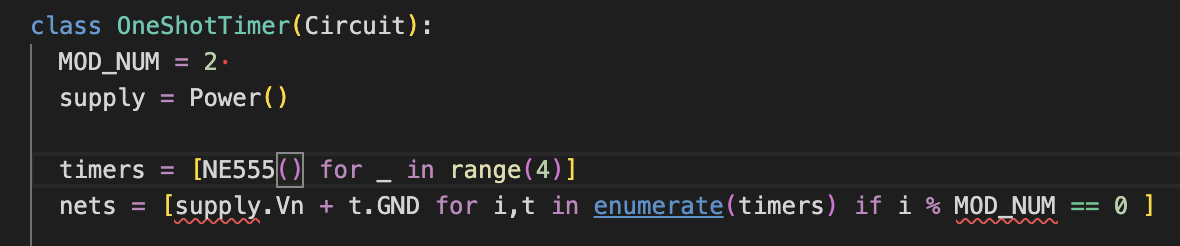
We define a class level attribute
MOD_NUM. This value is in the scope of the class definition.We define an input
Portcalledsupplyof typePowerto provide the positive and negative power leads.We define an array of components
NE555in the class definition. Notice that this is a list comprehension but it doesn’t reference anything in the class scope.Finally, we attempt to create a set of net connections with a list comprehension.
In the
expression,for-loop, andconditionalparts of the list comprehension, we attempted to access a reference to an object in the class scope.In the
for-loop, we referencetimersin the class scope and this is fine. No issues here - because the scope is the same as the class scope.In the
expressionand theconditional, we try and fail to reference objects in the class scope.In both of these cases, the scope is not the same as the class scope.
The language server warns us that this will not work when we run the code.
To make up for these short comings we can try a slightly different strategy:
  combined = zip(
    [supply.Vn] * len(timers),
    [MOD_NUM] * len(timers),
    timers,
    strict=True
  )
  nets = [gndref + t.GND for i,(gndref, modNum, t) in enumerate(combined) if i % modNum == 0 ]
Now the references to supply.Vn and MOD_NUM are included in the scope of list comprehension and we can achieve the
net connections that we were attempting. The only downside is that this is rather ungainly and ugly. It’s more difficult to
understand what connections we are actually making because there are 2 levels of indirection (the list comprehension’s for loop and the zip combining operation). Due to this, it is often more convenient to use the Imperative:
class OneShotTimer_Imperative(Circuit):
  MOD_NUM = 2
  supply = Power()
  timers = [NE555() for _ in range(4)]

  def __init__(self):
    self.nets = [
      self.supply.Vn + t.GND
      for i,t in enumerate(self.timers)
      if i % self.MOD_NUM == 0
    ]
This is a bit more readable. The only thing we sacrifice is verbosity. We end up needing multiple self. prefixes to reference the appropriate objects within the constructor’s context.
Defining Ports on Multiple Parents#
When defining a component, especially when using pin assignment, it can be tempting to do something like this:
class STM32H7(jitx.Component):
  PA = [Port() for _ in range(16)]
  ...

class Wrapper(jitx.Circuit):
  U = STM32H7()

  TEMP_ARRAY = [U.PA[2], U.PA[3]]
  # Code that uses `TEMP_ARRAY`.
  @provide.all_of(I2C)
  def I2C_PORT(self, b:I2C):
    return [{
      b.sda: self.TEMP_ARRAY[0],
      b.scl: self.TEMP_ARRAY[1],
    }]
Unfortunately, this would be a mistake. Because it is effectively defining two more ports on Wrapper that already have an existing parent, namely STM32. So this will cause the JITX runtime to throw an error:
footgun.design:
  design: footgun.design
  errors:
    translation failed:
      Child object <Port> has multiple parents, found at Wrapper.circuit.V.TEMP_ARRAY[0] and STM32H7.circuit.V.U.PA[2]
  hints:
    You should either assign Port objects to a Wrapper or a STM32H7 part of the design, but not both.
This error message is trying to tell you that the Port objects need to have one exclusive parent in the design tree.
By assigning PA[2] and PA[3] to the temporary array TEMP_ARRAY you have effectively added another parent for those objects.
The better way to do this - would be to define the temporary array inside the method:
class Wrapper(jitx.Circuit):
  U = STM32H7()

  @provide.all_of(I2C)
  def I2C_PORT(self, b:I2C):
    TEMP_ARRAY = [self.U.PA[2], self.U.PA[3]]
    return [{
      b.sda: TEMP_ARRAY[0],
      b.scl: TEMP_ARRAY[1],
    }]
Changing the name of a design#
In the python file for the top-level of your design, you will see a class that derives from jitx.Design, often through jitx.SampleDesign:
class NameOfYourProject(SampleDesign):
    circuit = TopLevel()
The name of this class is special. It identifies your design inside of the python project. This name is used as part of the identifier that maps your code design to the physical board design. The physical board design data is typically found in a relative directory named ./designs/path.to.NameOfYourProject/*. Changing the name of this class can sever the link to the physical design and have some negative side-effects including what may look like a loss of design data.
To change the name of a design you must:
Change the name of the
Designobject in your code.Change the name of the
designs/subfolder to the same fully qualified name.
In the example above - to change from NameOfYourProject to SuperDuperProject, you would need to change the class name and then change the designs subfolder to designs/path.to.SuperDuperProject/*.