

Transmission Lines from Nets#
The Signal Integrity (SI) problem generally requires the construction of transmission lines. The Net, typically used for constructing electrical net lists, lacks some nuance in this regard. With net connections, there is no ordering of the connection between pads. By the time we get to the board view tool, the user is on their own to get the transmission line right. Ordering of components, trace widths, and clearances become details to manage. Consistency is a goal that is difficult to achieve. Maintaining this kind of consistency is a challenge in many EDA tools.
JITX’s solution to this problem revolves around defining additional constraints that layer on top of a net connection. These constraints typically come in two forms:
Medium Independent Constraints - ordering of pads (topologies), widths of traces, etc.
Medium Dependent Constraints - timing delays, insertion loss limits, etc.
What is a Topology?#
In JITX, a “Route Topology” (usually shortened to topology) is an ordered set of connections between component pads. You can think of the topology as a tree where the edges are the “Topology Segments” and the nodes are physical component pads. Each node can attach to 1 or more segments.
Note that we said ordered, but not directed. There is no connotation of input or output, transmitter or receiver, applied to the endpoints or nodes of the topology tree.
The “Route Topology” tree is acyclic by definition. If we have nodes A, B, C, and D, then we can construct a topology A >> B >> D or we can construct A >> C >> D. But we can’t construct a topology that routes A >> D by two parallel B and C routes in the same topology.
For example:
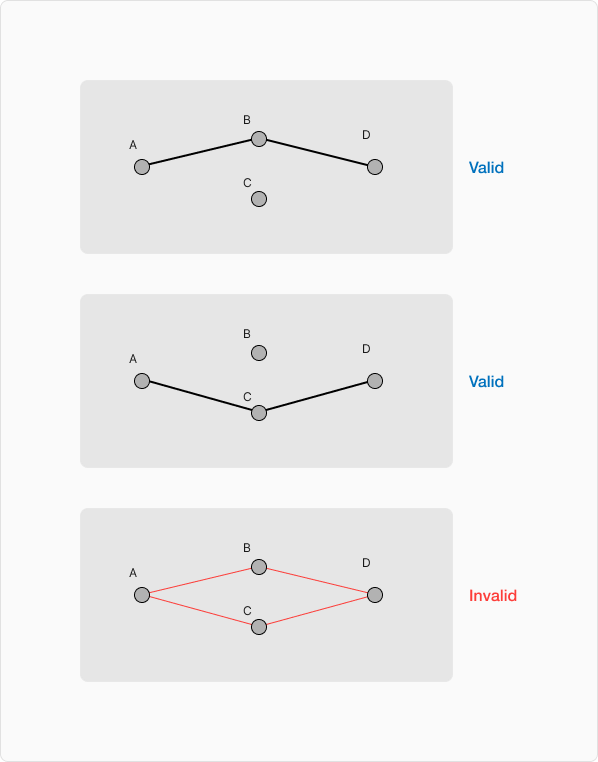
In other words, there can only be one path from A to D.
Valid Topology#
A topology can be considered valid or invalid. Sometimes it is not trivial to make this determination due to Pin Assignment.
Requirements
Each segment of a topology must be defined by a TopologyNet
The easiest way to construct a
TopologyNetis to use the>>operator.These are also called “topo-nets”.
Each node of a topology must associate with a physical pad.
This means a component port - not a circuit port.
See Circuit Port Forwarding for more info.
Pass through components (like resistors or blocking capacitors) need a BridgingPinModel.
Invalid Segments#
An “Invalid Segment” refers to any segment of a topology that is defined with a Net connection instead of a TopologyNet.
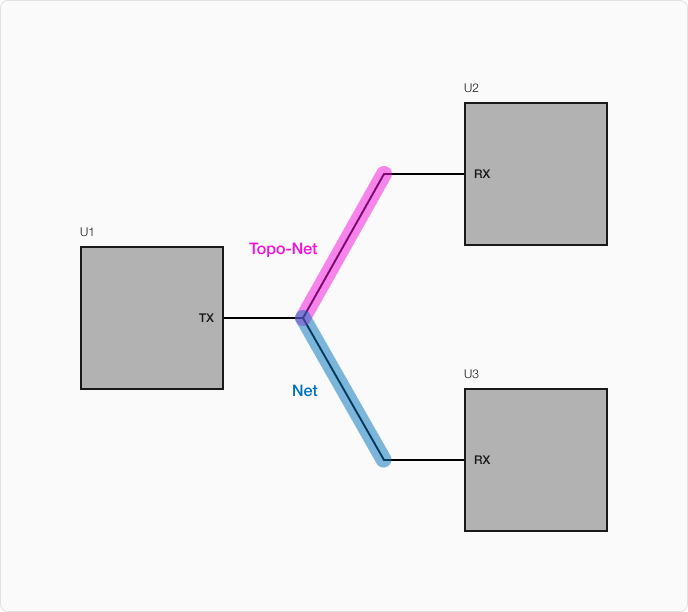
In this example, notice that the segment from U1.TX to U2.RX is a proper segment with the TopologyNet operator >>. In short hand, we typically call this a topo-net.
The segment from U1.TX to U3.RX only has a Net connection, typically created with + operator. This “appendage” net causes this topology to contain an invalid segment. When the routing engine encounters this topology, it can’t properly define the constraints and labels it as invalid.
Circuit Topology#
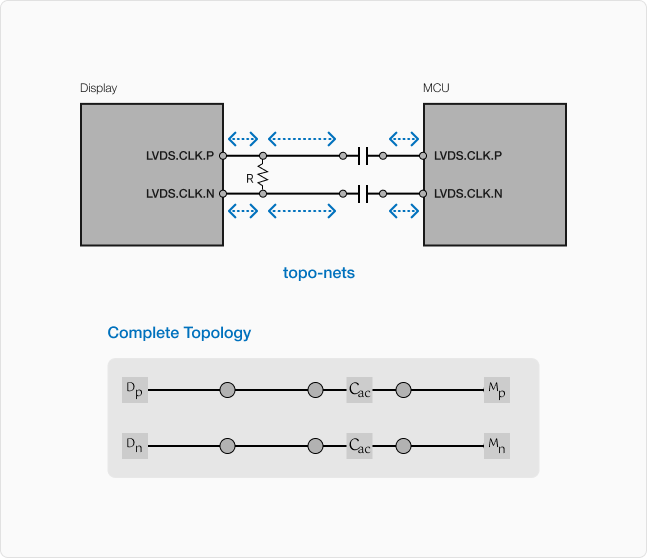
In most real-world signal integrity circuits, we typically don’t have just copper traces. There are typically various components like capacitors, ESD protection diodes, common-mode chokes, among others that are part of the complete signal topology.
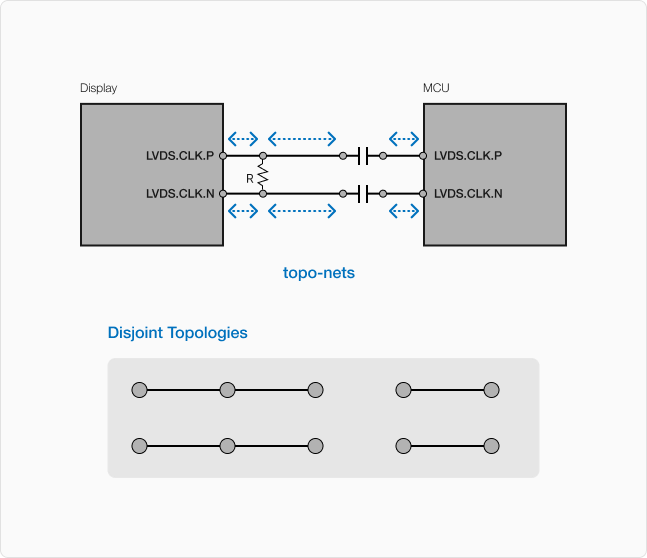
In the diagram above, the small circles are the nodes of the topologies, and the blue dotted arrows represent the topo-nets.
Here we see some common component examples - termination resistors and AC blocking caps. The insertion of these components causes our topology to become disjointed. Let’s say we wanted to apply a TimingDifferenceConstraint between the signals of the differential pair between MCU and Display. These disjointed topologies present a bit of a problem. For example, we might need a much more complicated constraint, like constraining the sum of the lengths of two pairs of topologies. But this would mean that compensating skew dynamically becomes basically impossible.
This is where the BridgingPinModel comes in. In general, PinModel objects are a representation of the typical characteristics of a component lead. For a “pass-through” component, we want a model that characterizes the signal flow between two leads of a component. The BridgingPinModel creates a link between disjointed routing topologies that utilize “pass-through” components.
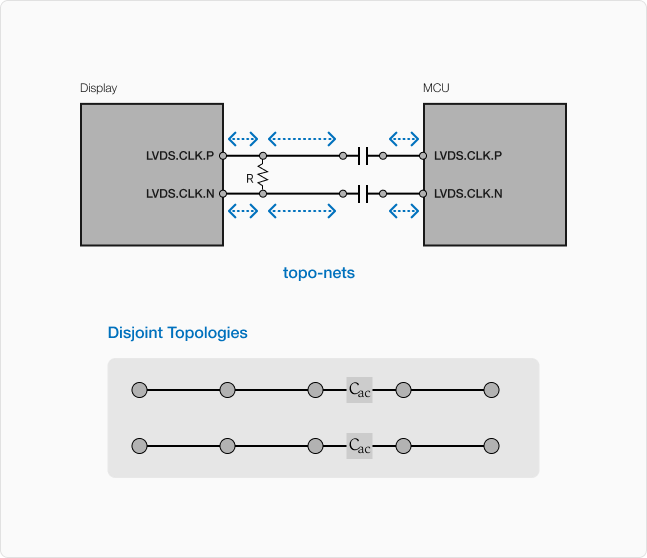
By adding a BridgingPinModel to the AC blocking capacitors, we collapse the 4 disjoint routing topologies into 2 circuit topologies.
Notice that we don’t have to add pin models on every component. As shown, the termination resistor doesn’t have a PinModel. This often can be useful when we don’t want to introduce cycles or multiple ambiguous paths in a topology.
With the models in place, there is a contiguous path from one endpoint MCU.LVDS.CLK.p to Display.LVDS.CLK.p (and similarly for the n side of the differential pair). Now we can add constraints between the two endpoints of these signals without issue.
Endpoint Pin Models#
Besides the BridgingPinModel for components like resistors and capacitors, an endpoint may provide a TerminatingPinModel. These models characterize the delay and loss from the silicon through the wire-bonding and out the package via its pins. In complex chips, this delay and loss may be different from one pin to another.
These models are not strictly necessary. If they are not provided, then the routing engine will just assume all pads have zero delay and loss.
To complete the circuit topology, we can include these pin models in our design:
These “Single-Ended” models are added with the TerminatingPinModel, typically by instantiating them in the derived Component class definition. We add one model for each of the physical component pads. The routing engine can then use this information to correctly compute delay and loss constraints for the entire topology.
Here is an example showing how to add TerminatingPinModel to a component:
import jitx
from jitx.net import Port, DiffPair
from jitx.si import TerminatingPinModel

class MyTransceiver(jitx.Component):
    TX = DiffPair()
    RX = DiffPair()

    # Each pin gets its own model with delay (seconds) and loss (dB).
    # These values represent the silicon-to-pad propagation characteristics.
    pm_tx_p = TerminatingPinModel(TX.p, delay=15e-12, loss=0.2)
    pm_tx_n = TerminatingPinModel(TX.n, delay=15e-12, loss=0.2)
    pm_rx_p = TerminatingPinModel(RX.p, delay=12e-12, loss=0.15)
    pm_rx_n = TerminatingPinModel(RX.n, delay=12e-12, loss=0.15)
The delay and loss values are typically found in the component datasheet under package parasitic or IBIS model specifications. When these models are present, the routing engine accounts for the internal delay and loss when computing whether a topology meets its constraints.
Circuit Topology Realization#
Realization is the process by which the abstract information of the circuit is formed into physical copper geometry in the board. This process has to take into account various clearance, width, and other requirements. It is where the rubber meets the road. The routing engine can either construct a circuit at this point - or it can’t and fails.
In the context of the SI topology, realization is affected by the choice of nodes and segments. One way that it affects realization is by the means of “Stubs.”
Consider this circuit definition:
class TopLevel(jitx.Circuit):

  A = Resistor(resistance=10.0)
  B = Resistor(resistance=10.0)
  C = Resistor(resistance=10.0)

  topos = [
    A.p1 >> B.p1 >> C.p1,
  ]
This is a simple topology consisting of two segments and three nodes.
Here is a reasonable expectation for how this might realize:
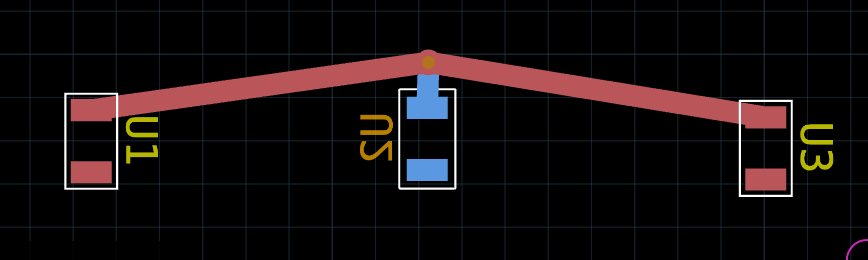
In this rendering:
A=>U1B=>U2C=>U3
I’ve placed B on the bottom layer and hence it requires a via. The choice of how to place the via is where things get tricky. The order of operations matters.
Order Matters#
When we drag out the via for the connection, we can do so by dragging the via from A.p1 or from B.p1 (we could also do C but in this case, it is symmetric with A). In the following video, I drag the via from B.p1
In this case, the “Stub” is the copper from the via to B.p1. Because the via was dragged out from a pad on B, the via is associated with B. If we were to move the B component, the via would move with it. The routing engine considers the via an extension of the B component.
That is what allows us to select A.p1, the via, and C.p1 and successfully route the signal topology. The via is effectively B.p1.
Now - what if we dragged the via out from A.p1 instead of B.p1:
On the surface, it would seem like these are exactly the same. But there is an important difference. Because the via was dragged out from A.p1, the via is now associated with the A component. If we moved A, the via would move with it. For the connection between A.p1 and B.p1, this association has no effect. We can still connect B.p1 to the via. But the “Stub” has moved - the stub is now A.p1 to the via.
This presents problems for connecting to C.p1. Because the via is a stub for A.p1, we can’t connect the via directly to C.p1. This would violate the constraints of the topology. The runtime prevents this connection because it is technically a circuit inconsistent with what is described in code. Hence the blue “There are no valid connections…” banner.
This phenomenon will apply equally to control points as well.
Circuit Port Forwarding#
In JITX we can use Circuit-derived class definitions to create sub-circuits and reusable designs. We use the same port terminology for both Circuit and Component to describe the inputs and outputs to a circuit or component. But the ports of a Circuit are different from the ports of a Component.
The ports in a Component map to a physical pad in a land pattern. This means that there is a physical manifestation of a Component port in the PCB. The ports of a Circuit don’t necessarily have a 1:1 mapping from port to pad. This causes a bit of an issue when attempting to define a topology. If a Circuit port maps to 3 physical pads in the circuit definition, then should the topology create a branching tree? Should the topology connect to them serially? What do we do about ambiguities?
Simple Topology#
We’re going to start off with a base case for demonstrating how topologies and Circuit definitions work together. In this example
we have two sub-circuits that we instantiate and connect together:
class InternalCircuit(jitx.Circuit):
    p = jitx.Port()

    R = Resistor(resistance=10.0)

    topos = [p >> R.p1]

class Parent(jitx.Circuit):
    A1 = InternalCircuit()
    A2 = InternalCircuit()

    topos = [A1.p >> A2.p]

    def __init__(self):
        rs = jitx.current.substrate.routing_structure(50.0)
        self.cst = Constrain(Topology(self.A1.p, self.A2.p)).structure(rs)
Here is a visual representation of this topology:
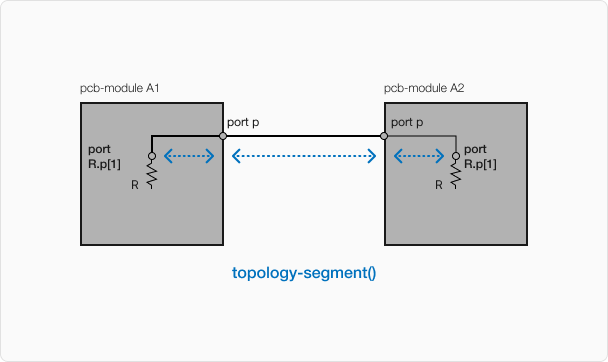
There are technically 3 topology segments in this design. But because Circuit ports are different - we really only have one physical topology segment. When a Circuit port connects to one and only one component port, the Circuit port “forwards” to the component port. In this example, the port p on InternalCircuit forwards to R.p1.
This “forwarding” concept is important because this allows us to apply constraints at the top level of a circuit. If we did not have this forwarding mechanism, then we would have to pass the routing structure in to the sub-circuit like this:
class NonForwardingExample(jitx.Circuit):
    """ More complicated circuit in a hypothetical
    case where circuit port forwarding was not a feature
    of JITX.
    """
    p = jitx.Port()

    R = Resistor(resistance=10.0)

    topos = [p >> R.p1]

    def __init__(self, rs:jitx.si.RoutingStructure):
        self.cst = jitx.si.Constrain(Topology(self.p, self.R.p1)).structure(rs)
This is not conducive to making reusable sub-circuits. Having to pass in the routing structure means that it must propagate to any sub-circuits in the same way. Passing arguments like this gets cumbersome. The forwarding mechanism allows us to avoid this complexity.
Bundles & More Components#
Let’s consider some more complex circuit examples using bundles instead of just individual single port nets.
Naive Approach#
We’re going to start with a straight forward approach where we just connect topologies in a logical way:
class B(jitx.Circuit):
    D = jitx.DiffPair()

    R = Resistor(resistance=100.0)

    MCU = SomeMCUWithLVDS()

    topos = [
        D.p >> R.p1 >> MCU.LVDS.p,
        D.n >> R.p2 >> MCU.LVDS.n
    ]

class Parent(jitx.Circuit):
    B1 = B()
    B2 = B()

    topos = [B1.D >> B2.D]

    def __init__(self):

        diff_100 = jitx.current.substrate.differential_routing_structure(100.0)

        self.lvds_cst = DiffPairConstraint(
            skew=jitx.Toleranced(0, 1.0e-12),
            loss=12.0,
            structure=diff_100,
            )

        self.lvds_cst.constrain(self.B1.D, self.B2.D)
Here is a visual representation of this topology:
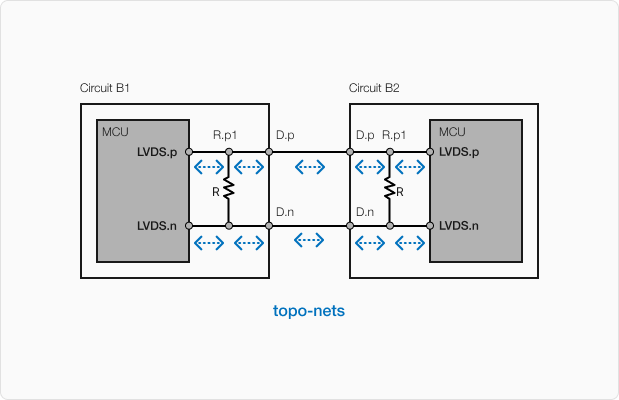
First, notice that our topology inside the sub-circuit B consists of a chain of connections from the port D to the port MCU.LVDS. We’ve effectively added a termination resistors between D and MCU.LVDS. By adding this node in the topology, we still have a single 1:1 circuit port to component port mapping.
If we look at how this design realizes in our circuit - we’ll see something unexpected:
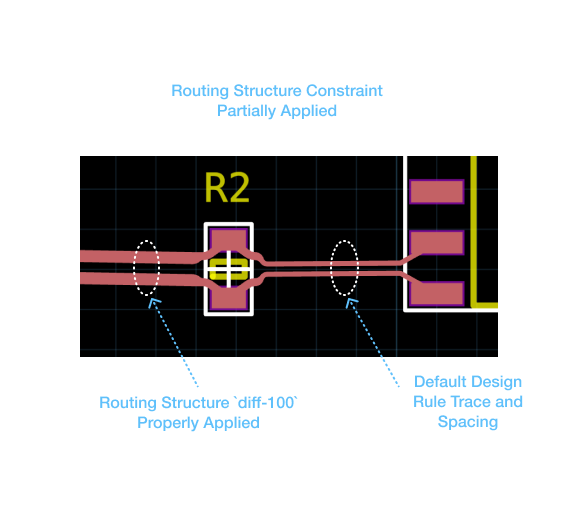
Notice how the diff_100 differential structure gets applied on the trace to the left of the resistor R but does not get applied to the traces from the R to the MCU. The issue is that the circuit port forwarding only extends to R. This means that when diff-structure is called, the port B1.D.P forwards to R.p1 only and that becomes the endpoint of the constraint application.
Constraining the entire topology#
Let’s try to address these issues with a slight refactor:
class B(jitx.Circuit):
    D = jitx.DiffPair()

    R = Resistor(resistance=100.0)

    MCU = SomeMCUWithLVDS()

    topos = [
        D.p >> R.p1 >> MCU.LVDS.p,
        D.n >> R.p2 >> MCU.LVDS.n
    ]

class Parent(jitx.Circuit):
    B1 = B()
    B2 = B()

    topos = [B1.D >> B2.D]

    def __init__(self):

        diff_100 = jitx.current.substrate.differential_routing_structure(100.0)

        self.lvds_cst = DiffPairConstraint(
            skew=jitx.Toleranced(0, 1.0e-12),
            loss=12.0,
            structure=diff_100,
            )

        self.lvds_cst.constrain(self.B1.MCU.LVDS, self.B2.MCU.LVDS)
The topology representation hasn’t changed, but we’ve modified the constraint application. In order to apply the differential routing structure diff_100 to the segment from R to MCU.LVDS, we need to apply the constraint to the LVDS endpoint on both sides.
Now when we route the design we see:
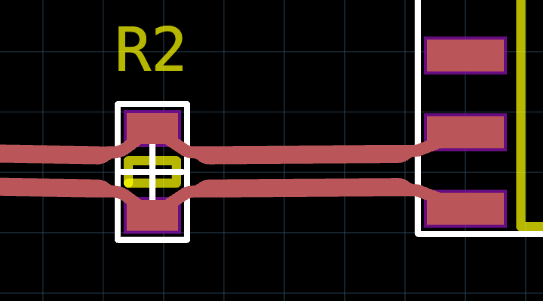
This isn’t optimal either. It requires the user of this circuit to understand the inner workings of circuit B. But it serves to demonstrate one of the limitations of the circuit port forwarding mechanism. For a more robust solution to this problem, see Signal Ends.
An Invalid Topology with a Circuit#
In the previous example, we added components to the design while preserving the 1:1 mapping of the circuit port to a component port. Now let’s see what happens when we violate this requirement:
class C(jitx.Circuit):
    p = jitx.Port()

    R1 = Resistor(resistance=10.0)
    R2 = Resistor(resistance=4.7)

    # This creates a 'Y' shaped topology
    topos = [
        p >> R1.p1,
        p >> R2.p1
    ]

class Parent(jitx.Circuit):
  C1 = C()
  C2 = C()

  topos = [C1.p >> C2.p]

  def __init__(self):
      rs = jitx.current.substrate.routing_structure(50.0)
      self.cst = Constrain(Topology(self.C1.p, self.C2.p)).structure(rs)
Here is a visual representation of this invalid topology:
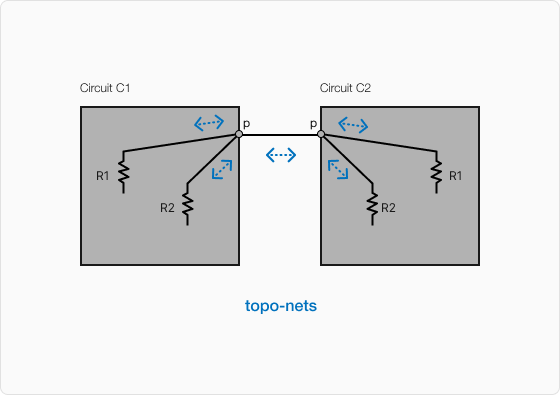
Notice how in this example, the circuit port p connects to one component port on each of R1 and R2. This causes a bit of ambiguity with respect to how the port p maps to a physical component pad. In this simple example, it isn’t as obvious to see why a Y junction can’t be created in this case. But this does violate the 1:1 circuit port to component port assumption. That assumption makes the logic and realization of these topologies easier as the circuits become more complex.
Fixing the Ambiguity#
class TestPoint(jitx.Component):
    tp = jitx.Port()
    ...

class D(jitx.Circuit):
    p = jitx.Port()

    TP = TestPoint()

    R1 = Resistor(resistance=10.0)
    R2 = Resistor(resistance=4.7)

    # This creates a 'Y' shaped topology
    #    with the test point at the junction
    #    as a physical pad.
    topos = [
        p >> TP.tp,
        TP.tp >> R1.p1,
        TP.tp >> R2.p1
    ]

class Parent(jitx.Circuit):
  D1 = D()
  D2 = D()

  topos = [D1.p >> D2.p]

  def __init__(self):
      rs = jitx.current.substrate.routing_structure(50.0)
      self.cst = Constrain(Topology(self.D1.p, self.D2.p)).structure(rs)
Here is a visual representation of this topology:
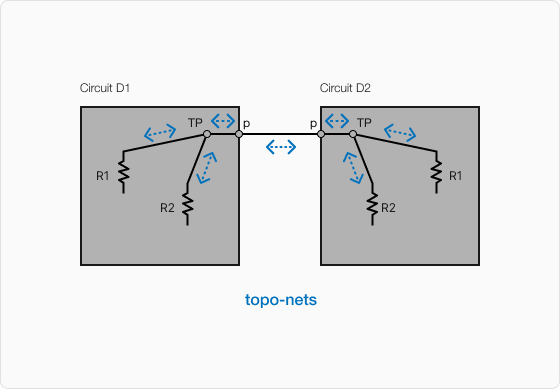
By inserting the test point component, we can control the 1:1 relationship and still achieve the Y structure for the topology.
Notice that this circuit has 7 TopologySegmentNet operations but it has only 1 topology. That topology has 5 total segments due to circuit port forwarding:
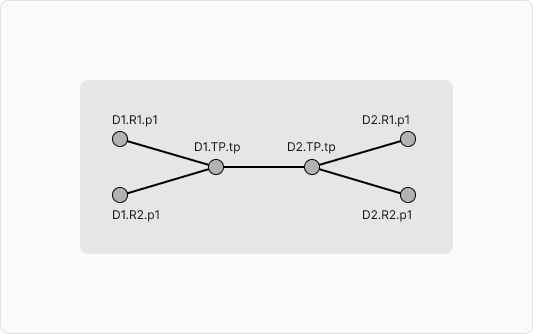
Notice that the circuits ports don’t exist in this topology. They effectively dissolve away as the topology is realized in the PCB.
Mental Model Recap#
The mental model for the SI topology system consists of two trees:
The Circuit Topology Tree
This is a tree consisting of many disjoint, ordered sub-graphs (Route Topologies)
The nodes of this graph are the component ports - not the circuit ports.
The edges of this graph are the
topo-nets
The Realization Tree
This is the tree of traces, vias, and component pads that realizes one of the Route Topologies.
The nodes of this tree are:
Component Pads
Vias
Control Points
The edges of this tree are the copper traces
The features of these trace are defined by Routing Structures.
The allowed paths of these traces are defined by the topology.
What’s Next: Let’s talk about constraints.