

Design Introspection#
Introspection is the ability to interrogate an object in a running program and then determine
important characteristics of that object. For instance, we might want to know what type an
object is – eg, str, float, etc. It can also be used to identify the value of attributes
or other structural aspects of an object.
In JITX, introspection of the circuit graph is an important feature for programmatic design of circuits. By allowing the user to introspect the running design, we allow for a wide range of behavior that would otherwise be impossible. For example, consider an activity like decorating the first pad of a land pattern with a silkscreen marker. It might consist of the following steps:
Determine what pads are present
Determine which pad is the first pad, possibly based on some filter provided by the user.
Determine the location of pad 1.
Determine design rule values for minimum silkscreen feature size and soldermask minimum sliver
In order to prevent hard-coded values, we may need to introspect at various levels in the design to determine the necessary information for programmatically generating features of a land pattern, component, or circuit.
Tree Introspection Tools#
The jitx.inspect library provides three standard tools for introspection. All three search by JITX structural type — you pass a class (like Pad, Port, or Component) and the tool finds all instances of that type (including subclasses) within the object tree.
extract - Recursively search for elements matching a given type. Returns just the elements. This is the simplest tool and the one you’ll use most often.
visit - Like
extract, but also returns a Trace for each element with metadata about where it was found in the tree (path, transform, parent).decompose - Shallow search of an object’s direct fields only (does not recurse into structural children). Useful for unpacking an object’s immediate contents.
All three return Python generators, so you’ll need to iterate over them or convert to a list if you want to index by position.
What types can you search for?#
These tools traverse the JITX structural hierarchy — objects derived from JITX base classes. Common searchable types include:
Type |
Where to find them |
What they represent |
|---|---|---|
Inside a Landpattern |
Physical copper pads |
|
Electrical connection points |
||
Inside a Circuit |
Physical components |
|
Inside another Circuit |
Sub-circuits / modules |
|
Inside a Symbol |
Schematic symbol pins |
|
Inside a Circuit |
Electrical connections |
These tools match using issubclass, so searching for a parent class also finds instances of all its subclasses.
.. note:: These tools are designed for JITX structural types, not arbitrary Python types. Searching for float or str will not return component properties — it would traverse looking for structural children of those types, which don’t exist.
What properties does a Pad have?#
A Pad has the following key attributes:
shape— The geometric shape of the pad (a Shape object such as a rectangle or circle).shapes— A dictionary mapping layer indices to layer-specific shapes, for pads that have different geometry on different layers.Positioning — Pad inherits from Positionable, so its position is set via the
.at(x, y, rotate=...)method and stored in itstransformattribute.
To get the location of a pad, use the transform attribute on the pad itself, or use the accumulated trace.transform returned by visit (which gives the position relative to the root object you searched from).
Example - Finding and Locating Pad 1#
Motivated by the exercise above, here is a complete example of finding pad 1 and determining its location. This example uses the SOIC generator, which produces pads on attributes named p[1], p[2], etc.
Step 1: Find all pads with extract#
The simplest approach is to use extract to get all pads:
from jitx.component import Component
from jitx.net import Port
from jitx.toleranced import Toleranced
from jitx.inspect import visit, extract
from jitx.landpattern import Pad
from jitxlib.symbols.box import BoxSymbol
from jitxlib.landpatterns.generators.soic import SOIC, SOIC_DEFAULT_LEAD_PROFILE

class NE555(Component):
  GND,TRIG,OUT,RESET,CONT,THRESH,DISCH,VCC = [Port() for _ in range(8)]

  lp = (SOIC(num_leads = 8)
    .lead_profile(SOIC_DEFAULT_LEAD_PROFILE)
    .narrow(Toleranced.min_max(4.81, 5.0)))
  symb = BoxSymbol()

  def get_first_pad(self) -> Pad:
    pds = list(extract(self.lp, Pad))  # extract returns a generator
    return pds[0]
This works but it assumes pads are defined in order. We can’t guarantee that for all landpatterns.
Step 2: Use visit to find a specific pad by name#
visit returns tuples of (trace, element), where the Trace object tells you where in the tree the element was found:
  def get_first_pad(self) -> Pad:
    for trace, pad in visit(self.lp, Pad):
      if str(trace.path) == "p[1]":
        return pad

    raise RuntimeError("No Pad with index = 1 found.")
Step 3: Get the pad’s location#
Now that we have the pad, we can get its position. The trace.transform returned by visit gives the accumulated transform from the root to the parent of the element. The pad’s own transform gives its local position:
  def get_first_pad_location(self):
    for trace, pad in visit(self.lp, Pad):
      if str(trace.path) == "p[1]":
        # pad.transform contains the pad's position (x, y, rotation)
        # set by .at(x, y, rotate=...) in the landpattern definition
        return pad.transform

    raise RuntimeError("No Pad with index = 1 found.")
The Trace object#
The Trace returned by visit has the following attributes:
path— A RefPath describing the attribute path from the root to the element. Its string representation matches Python accessor syntax (e.g.,"p[1]","power.Vp").transform— The accumulated Transform from the root to the element’s parent. This is useful for computing absolute positions in a layout.parent— The parent structural element that contains this element.trace— The Trace of the parent, allowing you to walk back up the tree.
The path uses Item elements to represent collection indices. For example, the pads of an SOIC landpattern would have paths like:
RefPath(('p', Item(1)))→"p[1]"RefPath(('p', Item(2)))→"p[2]"RefPath(('p', Item(3)))→"p[3]"
This is why we can match str(trace.path) on "p[1]" to find the first pad. This also works for finding arbitrary pads in a BGA, e.g., "p[Item('B', 13)]" for pad B13.
The filter parameter#
Both visit and extract accept an optional filter parameter — a predicate function that further narrows results:
  # Find only pads on the top side
  top_pads = list(extract(self.lp, Pad, filter=lambda p: p.transform.on == Side.Top))
Access the current object#
The tools described in the previous sections were focused on exploring the current node and its children. We can think of this as looking down the design tree. However, there is another common introspection task which requires us to look up the design tree. For this
application we will commonly use the current object.
The current object provides access to design-level context from anywhere in the design tree:
from jitx import current
from jitx.component import Component

class SomeComponent(Component):

  def __init__(self):
    # Retrieve a 50 ohm single-ended routing structure
    se50 = current.substrate.routing_structure(50.0)

    # Retrieve fabrication constraint information
    fab_constraints = current.substrate.constraints
    clearance = fab_constraints.min_silk_solder_mask_space

    # Retrieve the board shape
    sh = current.design.board.shape
Here we show a few examples of using the current object to access the context of design level objects in the design tree. This
ends up being a very useful way to write application agnostic code.
Example: Board Shaped Pour#
One common feature to add to a design is a ground plane on a particular layer or set of layers. Here is an example:
class TopLevel(Circuit):

  def __init__(self):

    self.GND = Net("GND")
    # ... Other circuit connections here ...

    sh = current.design.board.shape
    self.GNDPour = Pour(sh, layer=3, isolate=0.1, rank=1)
    self.GND += self.GNDPour
In this code, we introspect the design to grab the shape of the current board. Then we can use this shape to create a ground plane on the bottom side of the board. This ends up looking like this:
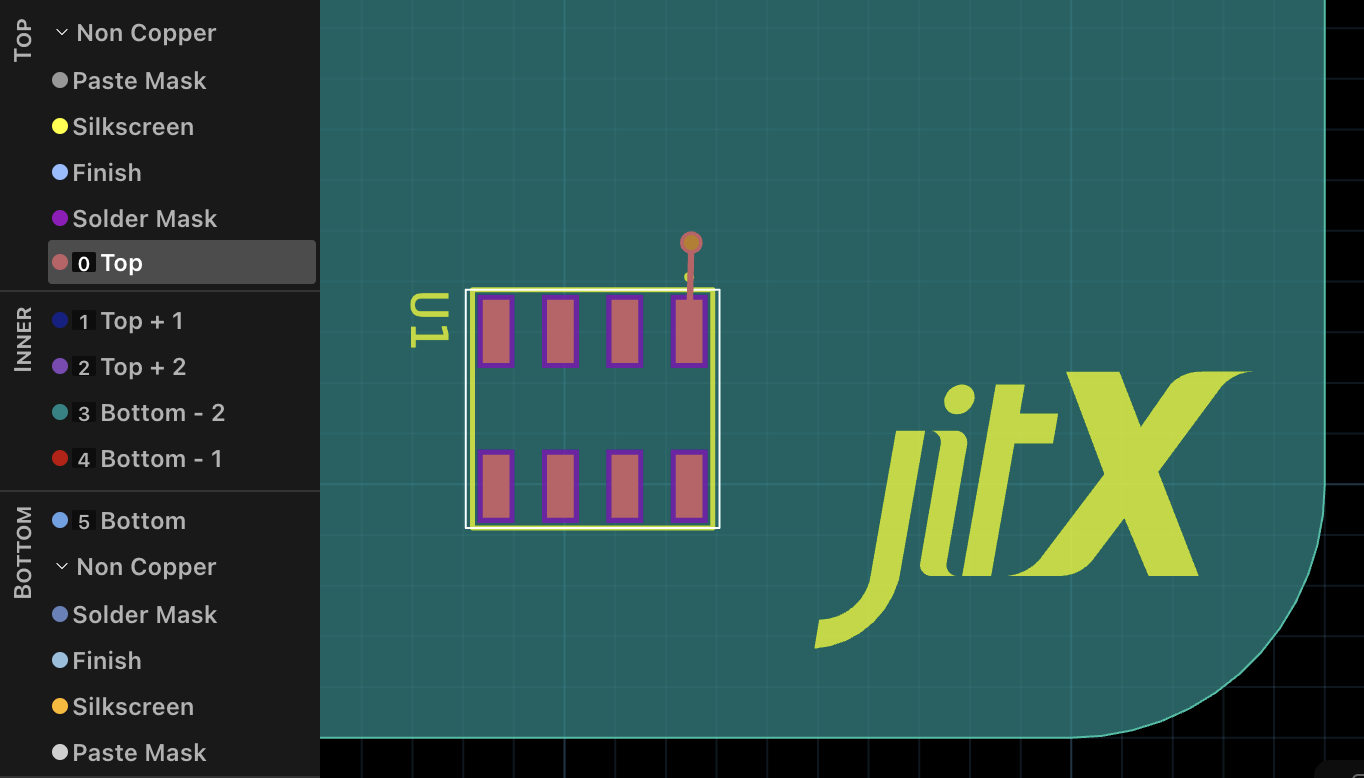
Here we see that a ground plane was placed on layer 3 (green, bounded by the board edge). The via is necessary for the ground plane to appear, otherwise the backend will assume that the pour is not connected to anything and remove it.