

JITX schematic options in Python#
Use these settings to adjust sheets, symbols, labels, groups, and notes. The appendix provides Python examples to adapt to your design.
Choose a setting#
Change |
Python setting |
Example |
|---|---|---|
Sheet size |
|
|
Symbol box |
|
|
Pin labels |
|
|
Reference and value |
|
|
Pin layout |
|
|
Exact artwork |
|
|
Shared style |
|
|
Blocks and notes |
|
|
Title and border artwork |
|
Units and page fitting#
Symbol geometry and text sizes use grid units: 1 unit = 1.27 mm. Text sizes are not points. Title-block width and height use mm.
Choose ISO A0–A5 or ANSI A–E paper. For a crowded sheet, use a larger format, reduce symbol or text size, or reorganize groups. Python has no shrink-to-fit setting. Fit to View changes the editor zoom; it does not resize the schematic.
Placement and formatting#
Groups define membership; the schematic editor controls page placement. Python has no group x/y, page-number, or block-size setting. Use custom symbol artwork when you need exact body, label, or pin positions.
Symbol text supports size, position, rotation, and anchoring. Font family, bold, kerning, and line spacing have no direct symbol-text settings; position separate Text shapes for multiple lines.
Symbol sizes and spacing#
Change the body size#
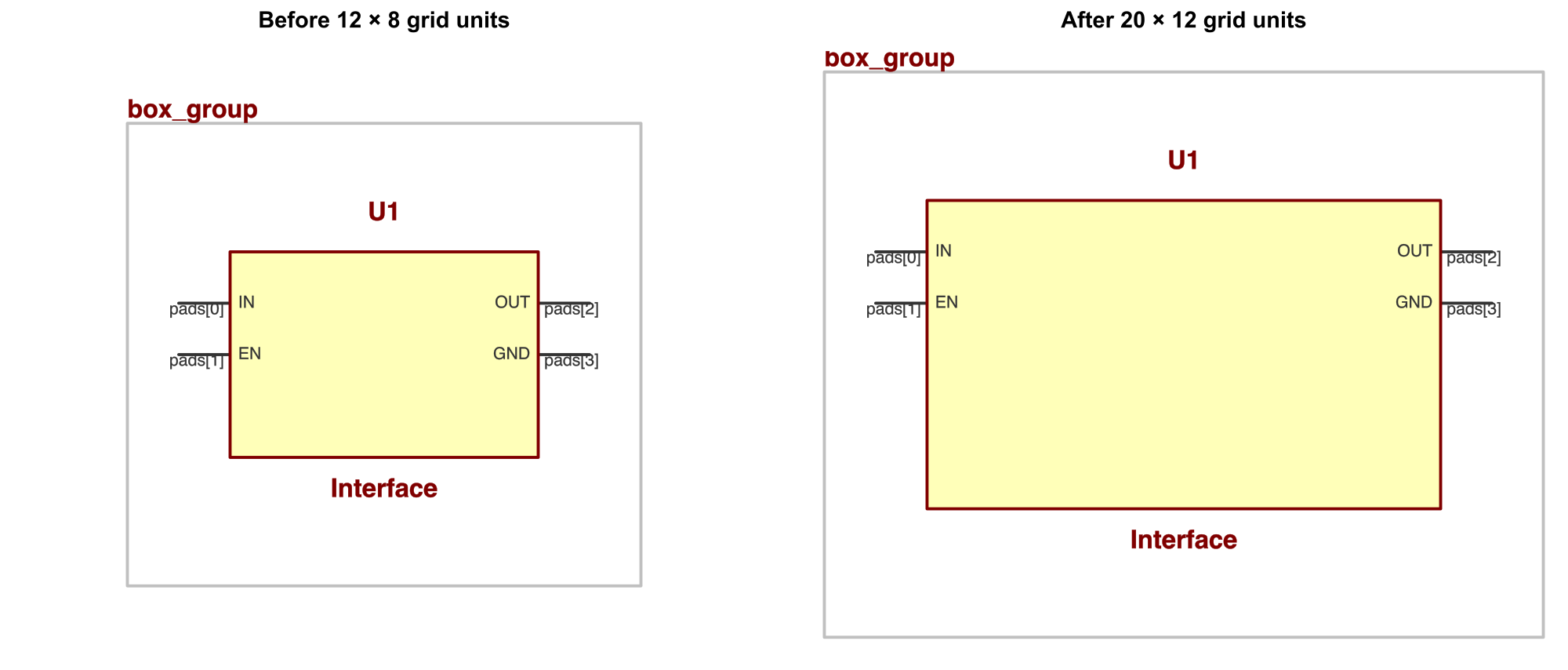
min_width, min_height: (12, 8) → (20, 12). These are minimum sizes; the box can grow to fit its pins. See A2.
Change the label sizes#
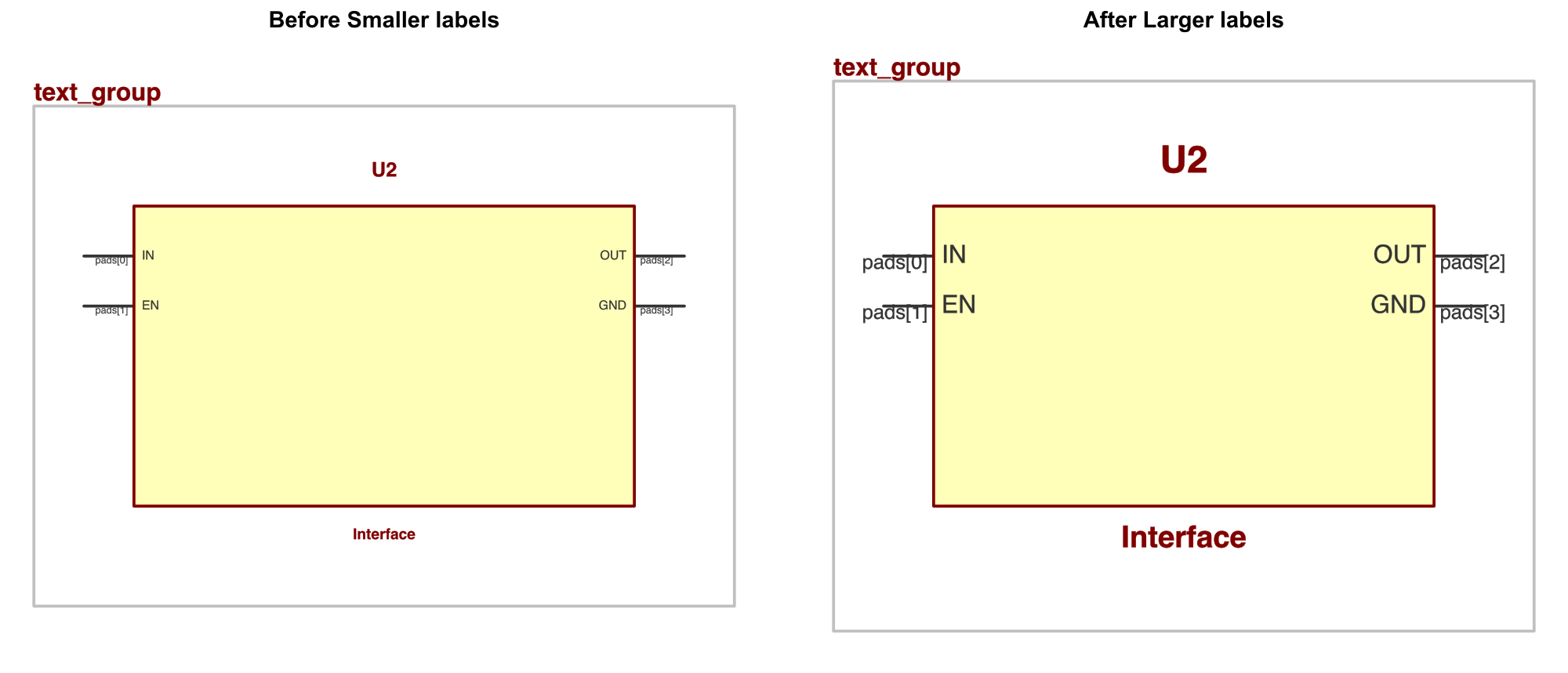
pin_name_size: 0.5 → 1.0; pad_name_size: 0.4 → 0.8; ref_size: 0.8 → 1.5; value_size: 0.6 → 1.2. The body stays the same size.
Increase pin spacing#
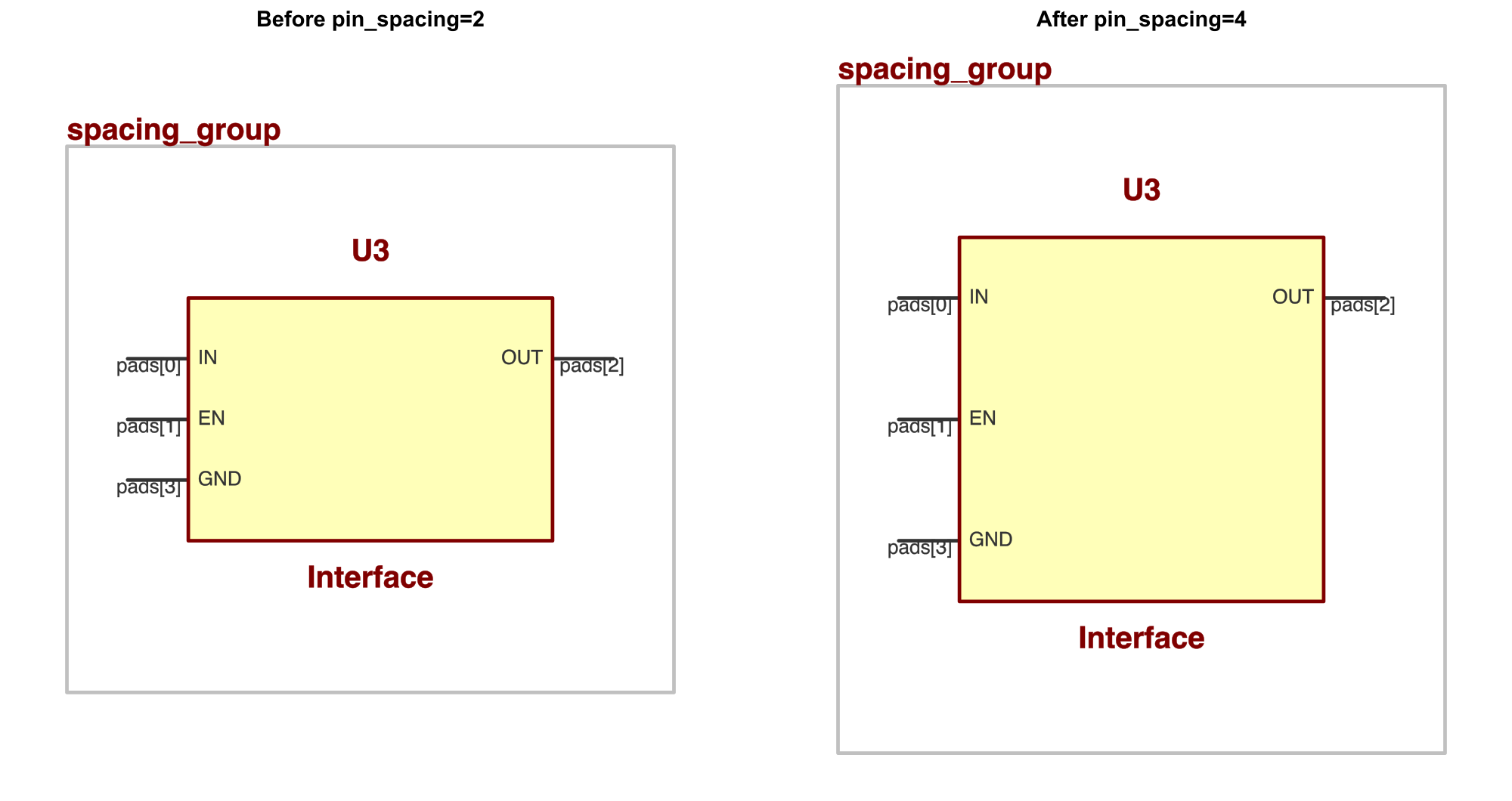
pin_spacing: 2 → 4 gives 2.54 → 5.08 mm pitch. Use group_spacing, row_spacing, and col_spacing to separate groups, rows, and columns.
Pin positions and custom text#
Choose pin sides#
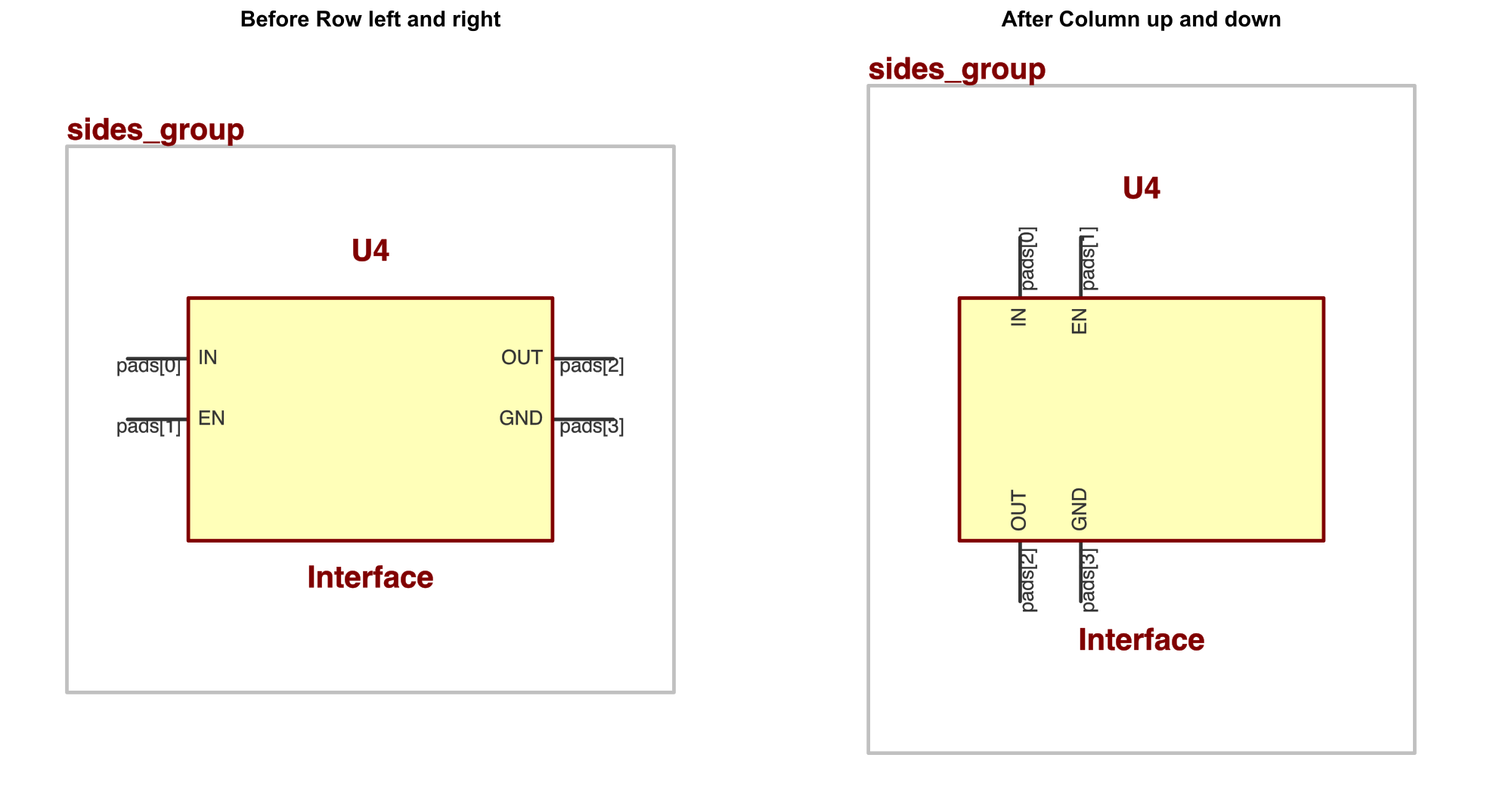
Row places pins on the left and right; Column places them at the top and bottom. PinGroup preserves the order you supply. See A2.
Rotate text independently#
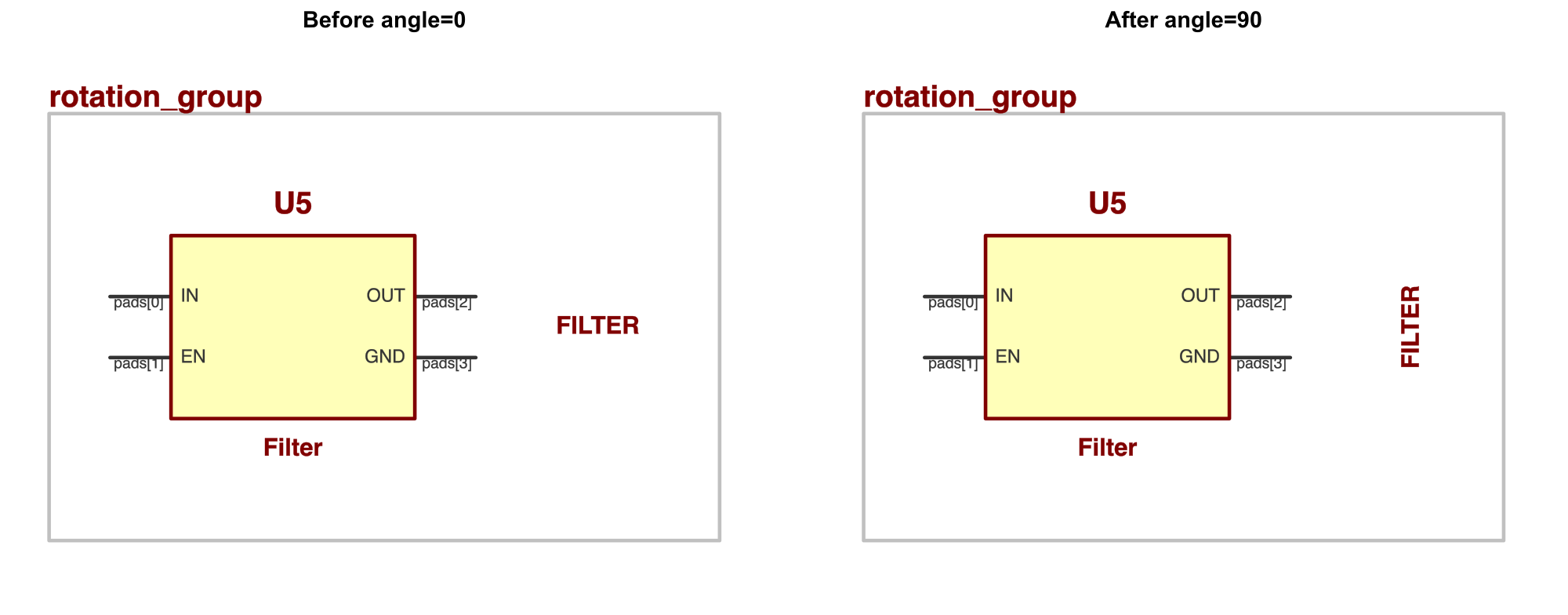
Transform((10, 0), 0) → Transform((10, 0), 90) rotates the FILTER text. The body and pins keep their orientation. See A3.
Keep text clear of filled artwork#
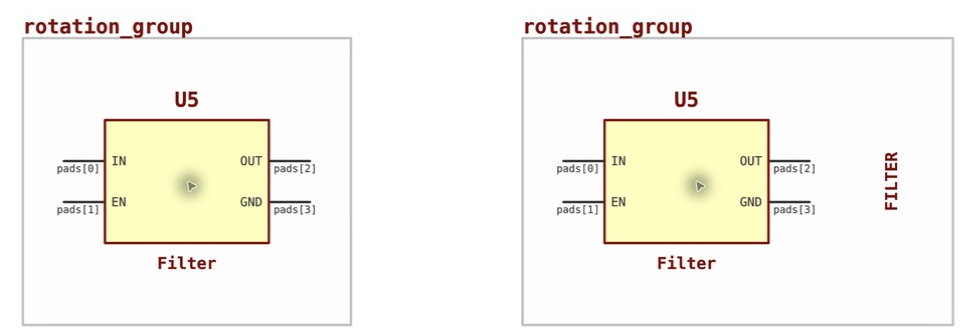
Left: text at (1, 0) is hidden by the body. Right: text at (10, 0) is visible. Check the schematic visually even when the issue count is zero.
For explicit pins, use integer coordinates and lengths. Left/right pins facing the same direction need distinct y coordinates; up/down pins need distinct x coordinates. Symbol orientation choices are multiples of 90°.
Sheets, title blocks, and notes#
Choose the sheet format#
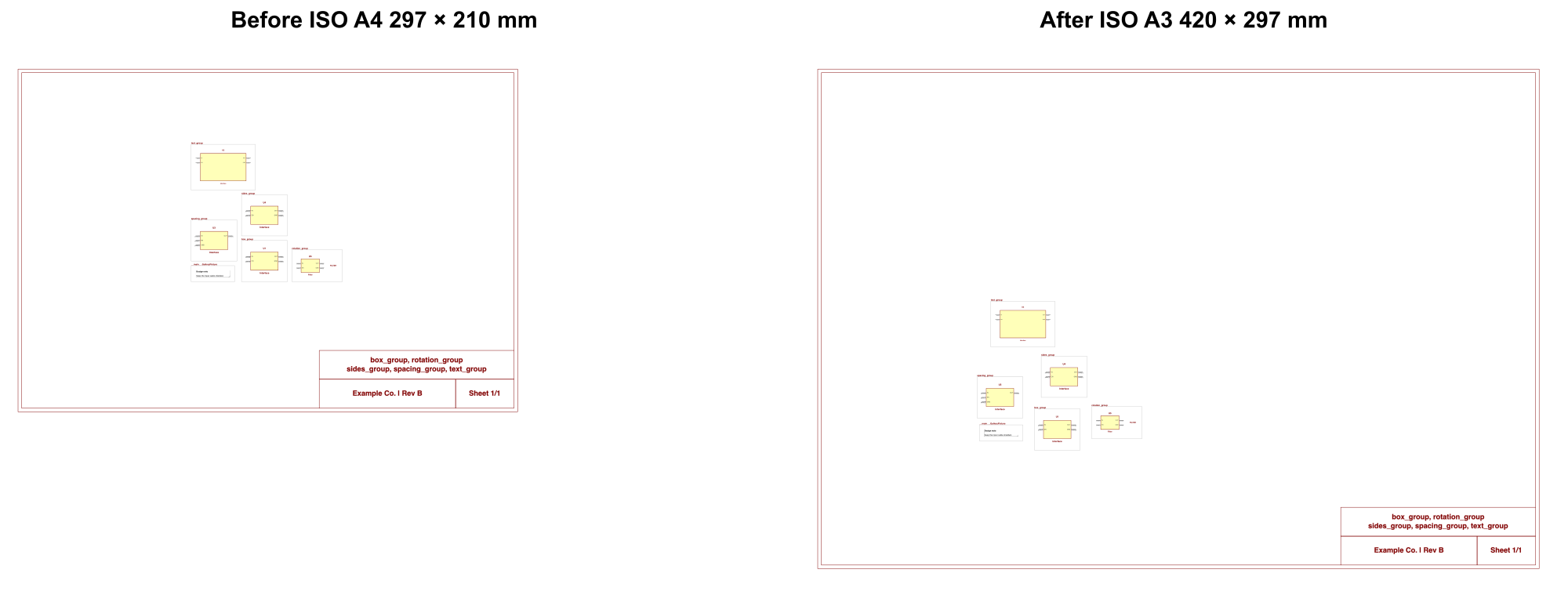
Paper.ISO_A4 → Paper.ISO_A3: 297 × 210 → 420 × 297 mm. Symbols keep their size; automatic group positions can change. See A1.
Size the title block#

SchematicTemplate.width, height: (108, 32) → (140, 24) mm. This changes the title block. Row heights and cell widths are fractions of the containing table. See A6.
Use >TITLE, >SHEET, and >NUMSHEETS for sheet data. Supply company, revision, author, and date as strings. Title-cell text uses fixed font size and alignment; the generated border has no replacement-symbol or line-style setting.
Add a Markdown note#
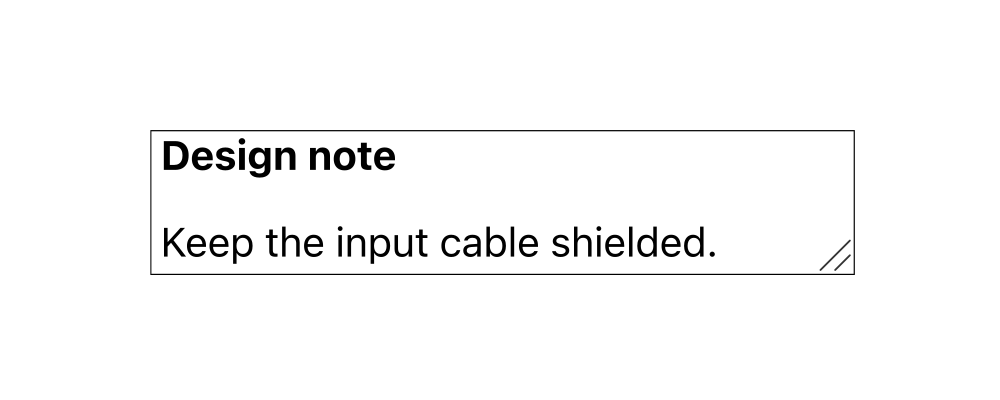
self.annotate("**Design note**\n\nKeep the input cable shielded.") adds this circuit note. The API sets content; position, rotation, and text size are not arguments. See A5.
Use SchematicMarking for SVG page artwork with explicit font and styling, or SchematicTitlePage for an SVG cover. These add artwork without replacing the border or reserving layout space. See A6.
Appendix: Python examples#
Read the examples in order; later examples reuse earlier imports and classes. Add your component landpatterns, board, substrate, and main circuit when integrating these schematic definitions.
A1 Set paper size#
from jitx.design import Design
from jitx.paper import Paper

class SheetDesign(Design):
    paper = Paper.ISO_A3
A2 Configure a box symbol#
from jitx.component import Component
from jitx.net import Port
from jitxlib.symbols.box import BoxConfig, BoxSymbol, Column, PinGroup, Row
from jitxlib.symbols.label import LabelConfig

class BoxDevice(Component):
    IN = Port()
    OUT = Port()
    VCC = Port()
    GND = Port()
    value = "Signal interface"
    reference_designator_prefix = "U"

    symbol = BoxSymbol(
        rows=[Row(left=PinGroup(IN), right=PinGroup(OUT))],
        columns=[Column(up=PinGroup(VCC), down=PinGroup(GND))],
        config=BoxConfig(
            min_width=12,
            min_height=8,
            pin_spacing=2,
            pin_length=2,
            pin_name_size=0.6,
            pad_name_size=0.5,
            label_config=LabelConfig(ref_size=1.0, value_size=0.8),
        ),
    )
For finer spacing, use corner_margin, PinGroup(pre_margin=..., post_margin=...), Row(top_margin=..., bottom_margin=...), or Column(left_margin=..., right_margin=...).
Appendix: Custom symbols and styles#
A3 Place pins and text#
from jitx.shapes.composites import rectangle
from jitx.shapes.primitive import Text
from jitx.symbol import Pin, Symbol, SymbolMapping, SymbolOrientation
from jitx.transform import Transform

class CustomSymbol(Symbol):
    pin_name_size = 0.6
    pad_name_size = 0.5
    orientation = SymbolOrientation([0, 180])
    body = rectangle(8, 6)
    input_pin = Pin.left((-4, 1), length=2)
    enable_pin = Pin.left((-4, -1), length=2, pin_name_size=0.5)
    output_pin = Pin.right((4, 0), length=2)
    reference = Transform((0, 4)) * Text(">REF", 1.0)
    value = Transform((0, -4)) * Text(">VALUE", 0.8)
    note = Transform((10, 0), 90) * Text("FILTER", 0.7)


class CustomDevice(Component):
    IN = Port()
    EN = Port()
    OUT = Port()
    value = "Filter"
    reference_designator_prefix = "U"
    symbol = CustomSymbol()
    mapping = SymbolMapping({
        IN: symbol.input_pin,
        EN: symbol.enable_pin,
        OUT: symbol.output_pin,
    })
A4 Set defaults for library symbols#
from jitx.circuit import Circuit
from jitxlib.symbols.context import SymbolStyleContext

class AutoDevice(Component):
    IN = Port()
    OUT = Port()
    symbol = BoxSymbol()


class StyledCircuit(Circuit):
    style = SymbolStyleContext(
        box_config=BoxConfig(min_width=10, pin_name_size=0.6),
        label_config=LabelConfig(ref_size=0.9, value_size=None),
    )
    device = AutoDevice()
An explicit symbol configuration takes precedence over these defaults. The context does not style sheet titles or Markdown notes.
Appendix: Groups and sheet formatting#
A5 Group components and add a note#
from jitx.circuit import Circuit, SchematicGroup

class SignalCircuit(Circuit):
    source = BoxDevice()
    filter = CustomDevice()

    def __init__(self):
        self.signal = self.source.OUT + self.filter.IN
        self.signal_path = SchematicGroup(self.source, self.filter)
        self.annotate("**Signal path**\n\nKeep the input cable shielded.")
A6 Format the title block and page artwork#
from jitx.anchor import Anchor
from jitx.schematic import (
    AuthorRow, AuthorTable, DataCell, SchematicMarking,
    SchematicTemplate, SchematicTitlePage,
)

class CompanyTemplate(SchematicTemplate):
    width = 108
    height = 32
    table = AuthorTable(rows=[
        AuthorRow(cells=[DataCell(">TITLE")], height=0.5),
        AuthorRow(cells=[
            DataCell("Example Co. | Rev B", width=0.7),
            DataCell("Sheet >SHEET/>NUMSHEETS", width=0.3),
        ], height=0.5),
    ])


class BrandedDesign(Design):
    paper = Paper.ISO_A3
    schematic_template = CompanyTemplate()
    schematic_markings = [SchematicMarking(
        '<g><text x="15" y="8" font-size="3" '
        'font-family="sans-serif" fill="black">Engineering copy</text></g>',
        Anchor.NW,
    )]
    schematic_title_page = SchematicTitlePage(
        '<svg xmlns="http://www.w3.org/2000/svg" '
        'width="420" height="297" viewBox="0 0 420 297">'
        '<text x="30" y="60" font-size="12" fill="black">'
        'Signal Interface — Rev B</text></svg>'
    )